






how to change iphone name: Settings Steps for AirDrop and Hotspot Your iPhone’s device name is the label used to identify it in AirDrop, Bluetooth, Personal Hotspot, iCloud, and when you connect it to a computer. To rename it, go to Settings → General → About → Name, enter the name you want, then tap […]
how to change iphone name: Settings Steps for AirDrop and Hotspot
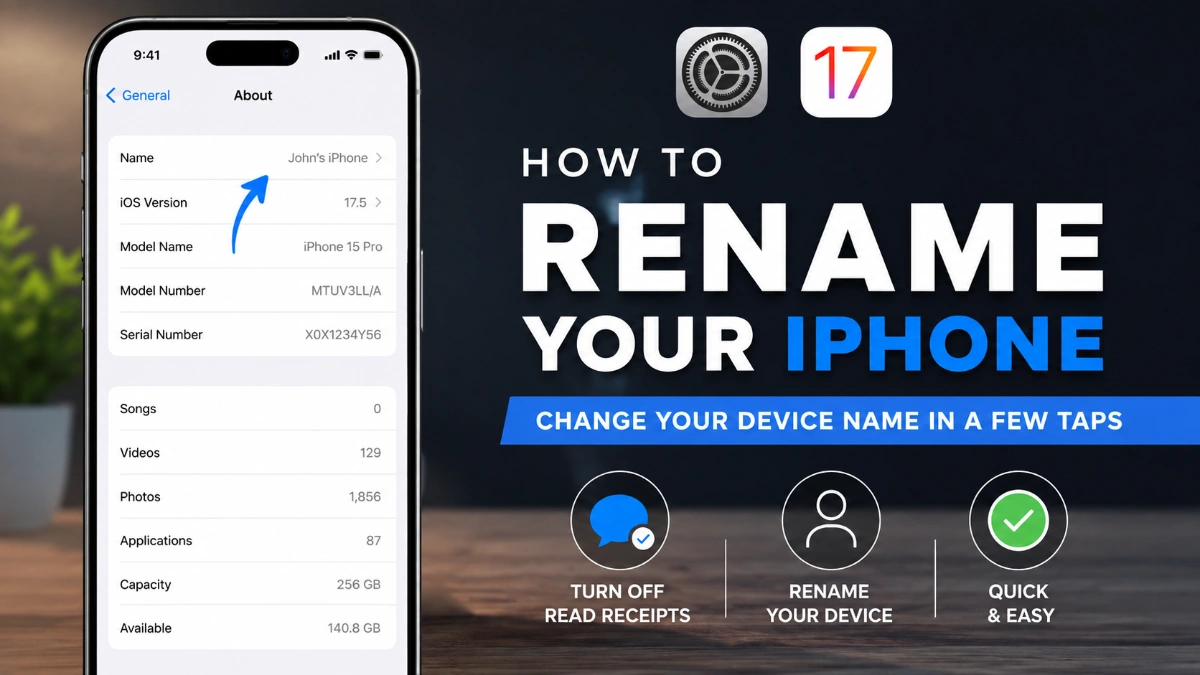
Your iPhone’s device name is the label used to identify it in AirDrop, Bluetooth, Personal Hotspot, iCloud, and when you connect it to a computer. To rename it, go to Settings → General → About → Name, enter the name you want, then tap Done.
Change Your iPhone’s Device Name
If you are looking for how to change iphone name, you can do it directly in the Settings app. You do not need to change your Apple Account details or install another app.
- Open Settings.
- Tap General.
- Tap About.
- Tap Name.
- Edit the existing name or clear it and type a new one.
- Tap Done.
That is all you need to do for how to change iphone name. The new label becomes the name your phone uses in supported Apple services and on connected computers.
What Changes—and What Does Not
Changing the device name changes only the label for that iPhone. It does not change your Apple Account name, password, phone number, contacts, photos, apps, messages, or files.
For example, you might rename a phone from “iPhone” to “Ayesha’s iPhone” or “Work iPhone” to make it easier to recognize. The phone remains associated with the same account and keeps the same content.
Where Your New Name Appears
When you complete how to change iphone name, Apple uses the updated device name in several common places.
| Service or connection | How the name is used |
| iCloud | Identifies the iPhone among devices connected to your account |
| AirDrop | Helps identify your iPhone during nearby sharing |
| Bluetooth | Identifies the iPhone to compatible nearby devices |
| Personal Hotspot | Becomes the name of the hotspot shared by your iPhone |
| Computer connection | Identifies the iPhone when connected to a Mac or Windows computer |
The new name may not appear instantly on every connected device. If another device still displays an old label, reconnect the relevant service or check whether that device has saved connection information.
Your Hotspot Uses the Device Name
One useful reason to learn how to change iphone name is to rename your Personal Hotspot. The name of a Personal Hotspot is the same as the name of the device providing it.
This makes it easier for a laptop, tablet, or family member’s phone to identify the correct hotspot in a Wi‑Fi list. For example, “Rohan iPhone” is easier to recognize than a generic default device name.
If you change the name while Personal Hotspot is active, turn Personal Hotspot off and back on if another device continues to show the older label.
iPhone Name vs Bluetooth Accessory Name
Your iPhone name identifies the phone itself. It does not rename Bluetooth accessories such as headphones, speakers, keyboards, game controllers, or a car audio system.
To change the name of a connected Bluetooth accessory on an iPhone:
- Open Settings.
- Tap Bluetooth.
- Tap the information button beside the connected accessory.
- Tap Name.
- Enter the new accessory name.
This distinction matters when following how to change iphone name: changing the phone name changes the phone’s label, while an accessory needs to be renamed separately.
Confirm That the New Name Saved
The simplest way to check your update is to return to:
Settings → General → About → Name
If the new text appears there, the device name has been saved. You can then check the service that matters to you most, such as AirDrop, Bluetooth, Personal Hotspot, or a computer connection.
If your Mac, car, speaker, or another device still shows the old name, try these steps:
- Disconnect and reconnect the iPhone.
- Turn Bluetooth or Wi‑Fi off and on, depending on the connection you are using.
- Restart the iPhone and the other device if the previous label remains visible.
- If a Bluetooth device has saved the old pairing entry, remove that entry and pair the iPhone again when appropriate.
Choose a Clear, Privacy-Conscious Name
A useful iPhone name should help you recognize the device without exposing unnecessary personal information. This is especially important if you use AirDrop or Personal Hotspot in public places.
Good options include:
- Ayaan’s iPhone
- Office iPhone
- Travel Phone
- Family iPhone
- iPhone 15 for Work
Avoid adding private details such as your full legal name, address, or phone number. A short and recognizable name is usually the most practical choice.
Knowing how to change iphone name can also help you keep multiple devices organized, but each product has its own naming controls.
iPad
On an iPad, use the same general path:
Settings → General → About → Name
AirPods
To rename AirPods, connect and wear them, then open Settings and tap the AirPods name near the top of the screen. Tap the current name and enter a new one.
Other Bluetooth Accessories
Bluetooth accessories can be renamed individually from Settings → Bluetooth when they are connected. This lets you distinguish devices with similar names, such as two pairs of headphones in the same household.
Common Questions
Does changing my iPhone name change my Apple Account?
No. The device name is separate from your Apple Account profile, password, and personal account information.
Does my Personal Hotspot use the same name as my iPhone?
Yes. Changing the iPhone device name changes the name used for its Personal Hotspot.
Can I rename my iPhone more than once?
Yes. You can return to Settings → General → About → Name whenever you want to edit it.
Why does my computer or car show the old iPhone name?
The other device may still hold a saved connection label. Disconnect and reconnect first; if necessary, restart the devices or remove the saved Bluetooth pairing and pair again.
Will changing the name delete anything from my iPhone?
No. Renaming the device does not affect your photos, apps, contacts, messages, files, or settings.
Does this work on an iPad too?
Yes. The iPad uses the same path: Settings → General → About → Name.
Can I rename Bluetooth headphones from my iPhone?
Yes, if the accessory supports renaming and is connected. Go to Settings → Bluetooth, select the accessory’s information button, then choose Name.
Is my iPhone name the same as my contact name?
No. Your contact name identifies you in your contact card, while the device name identifies the iPhone itself.
Frequently Asked Questions
Open Settings, select General, tap About, and choose Name.
No. Your Personal Hotspot uses your iPhone’s device name, so changing the phone name also changes the hotspot name.
It changes the label used to identify the iPhone in AirDrop, making it easier to recognize during sharing.
Your device name can be visible in sharing and connection contexts. A shorter label can reveal less personal information.
Yes. Names such as “Work iPhone” or “Office Phone” can help distinguish it from a personal or family device.
No. AirPods have their own name setting and must be renamed separately.
Reconnect Bluetooth first. If the old label remains, restart the devices or remove the stored pairing and connect again.
Yes. The new device name is used when the iPhone is connected to a computer.